In this tutorial, we will explore the basics of publishing and consuming messages. The source code for this example is available here
Introducing the Services
In this tutorial, we’ll work with three services:
- Client – A simple console application that publishes a message to simulate an order arriving from the frontend.
- OrderService – Handles incoming orders. After processing an order, it publishes another message to continue the workflow.
- InventoryService – Listens for order-processing–related messages and handles the inventory side of the workflow.
In this setup:
- The Client acts as a Producer — it only publishes messages.
- The InventoryService acts as a Consumer — it only receives messages.
- The OrderService is both a Producer and a Consumer — it consumes one message and then publishes another.
Explanation
You need to understand these 5 things to have a basic knowledge of Distributed Communication with OpenTransit.
- Defining Messages
- How Messages are published
- How Messages are Consumed
- How the OpenTransit Setup is done
- The Topology
1. Defining Messages
Messages are the means of communication between Services. They can be defined using classes, interfaces, or records.
In this project, we define two messages using C# classes: SubmitOrder and ProcessOrder.
- The Client publishes a SubmitOrder message.
- The OrderService consumes SubmitOrder, processes it, and then publishes ProcessOrder.
- The InventoryService consumes ProcessOrder.
Sharing Message Types Across Projects
When a message is used by multiple applications—such as a producer and a consumer—they must use the exact same namespace for the message type.
For example:
- SubmitOrder is used by both Client and OrderService → same namespace required
- ProcessOrder is used by OrderService and InventoryService → same namespace required
To simplify this, we created a shared class library that contains the message definitions. This is the easiest and most maintainable approach.
However, using a shared library is not mandatory. Each project may define its own copy of the message class, as long as the namespace matches exactly, ensuring that the broker treats them as the same message type.
2. Publishing Messages
Messages are published by Producers. A Producer exposes a Publish(T message) method, which is used to send messages to the broker.
(We’ll cover Producers in detail later in the documentation.)
In this example, messages are published from two places:
- From the Client project’s
Program.cs
var bus = host.Services.GetService<IBus>();

var submitOrderMessage = new SubmitOrder { OrderId = "123" };

if (bus is not null)
{
    await bus.Publish(submitOrderMessage);
    Console.WriteLine("SubmitOrder Message is published");
}
- From inside the SubmitOrderConsumer
public class SubmitOrderConsumer : IConsumer<SubmitOrder>
{
    public async Task Consume(ConsumeContext<SubmitOrder> context)
    {
        Console.WriteLine($"Inside SubmitOrderConsumer. Consuming the Message, OrderId: {context.Message.OrderId}");

        await Task.Delay(5000);

        var processOrder = new ProcessOrder { OrderId = context.Message.OrderId };
        await context.Publish(processOrder);
        Console.WriteLine("ProcessOrder Message is published.");
    }
}
Both IBus and ConsumeContext<T> are Producers. You may call Publish(T message) on either of them.
When publishing inside a Consumer, it is highly recommended to use the ConsumeContext<T> Producer as we have done in the SubmitOrderConsumer. We’ll discuss why in the dedicated Producers section.
When publishing outside a Consumer, you can resolve the IBus service and publish messages using it like we have done in the Client Project's Program.cs.
In OpenTransit, the necessary services (such as IBus) are registered in Program.cs(See the Setup, allowing you to resolve and use them throughout the application.
3. Consuming a Message:
To consume a message of type T, you need to implement IConsumer<T>.
In our example, we have two consumers:
- SubmitOrderConsumer in the OrderService
public class SubmitOrderConsumer : IConsumer<SubmitOrder>
{
    public async Task Consume(ConsumeContext<SubmitOrder> context)
    {
        Console.WriteLine($"Inside SubmitOrderConsumer. Consuming the Message, OrderId: {context.Message.OrderId}");

        await Task.Delay(5000);

        var processOrder = new ProcessOrder { OrderId = context.Message.OrderId };
        await context.Publish(processOrder);
        Console.WriteLine("ProcessOrder Message is published.");
    }
}
- ProcessOrderConsumer in the InventoryService
public class ProcessOrderConsumer : IConsumer<ProcessOrder>
{
    public Task Consume(ConsumeContext<ProcessOrder> context)
    {
        Console.WriteLine($"Inside ProcessOrder Consumer: Consuming the Message. OrderId: {context.Message.OrderId}");
        return Task.CompletedTask;
    }
}
Each consumer must also be registered in the OpenTransit Setup so the framework knows to create and connect them to the message pipeline.
Publishing from inside a Consumer
The IConsumer<T> defines a Consume method which is called when a message of type T is consumed. The method passes a Producer namely ConsumeContext<T>, it is highly recommended to use this producer(ConsumeContext) when we publish messages from inside the consumer. As you see we have done it in the SubmitOrderConsumer.
4. MassTransit Setup:
We configure OpenTransit in the Service Registration section of Program.cs.
In this step, we perform three main tasks:
Register the required services
Simply callbuilder.Services.AddMassTransit()and it will register everything needed.Configure the connection to the message broker
Register the consumers(if any)
All the above 3 tasks is done on the Program.cs of OrderService
builder.Services.AddMassTransit(x =>
{
    x.AddConsumer<SubmitOrderConsumer>();

    x.UsingRabbitMq((context, cfg) =>
    {
        cfg.Host("localhost", "/", h =>
        {
            h.Username("guest");
            h.Password("guest");
        });
        cfg.ConfigureEndpoints(context);
    });
});
However, the Client doesn't consume any messages. So no Consumer is registered, and the ConfigureEndpoints() method isn't called.
5. The Topology:
This example uses broker-agnostic configuration, so you don’t need to understand the broker's internal topology for basic communication.
Here, we only used the UsingRabbitMq method to provide the Connection Configuration and to configure the Publish and Receive Endpoints(a generic concept among all the brokers) on the broker.
Since this Configurations aren't RabbitMQ specific, and you may use any other broker here and, the Message Communication would work fine. We will add examples with other brokers soon.
Generic Broker Topology
In this project, we work with two message types: SubmitOrder and ProcessOrder.
Based on these message types, the topology is set up in the following way:
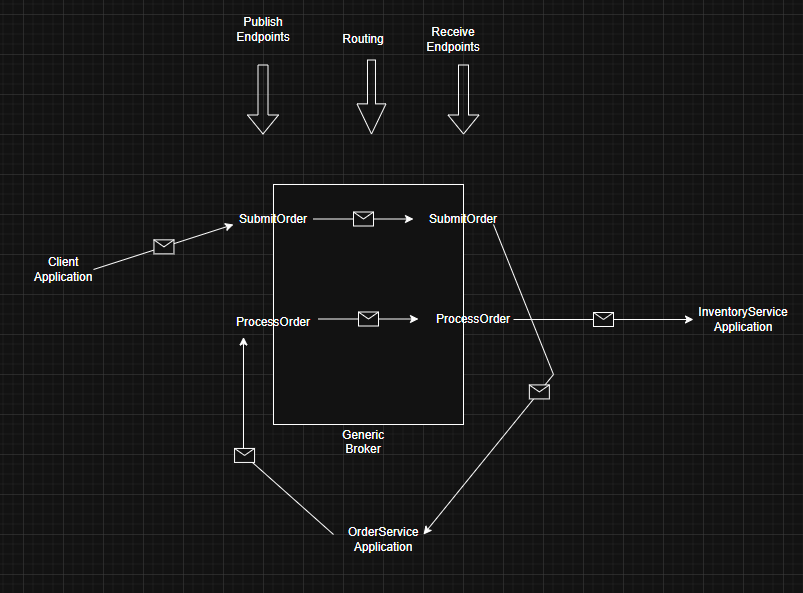
- Two Publish Endpoints and Two Receive Endpoints are created, one pair for each message type.
- Each
IConsumer<T>is automatically subscribed to the Receive Endpoint for its message type T. - When you call
Publish(T message), the message is sent to the corresponding Publish Endpoint for type T. - The Receive Endpoint for message type T is bound to the Publish Endpoint of T.
This ensures that whenever a message of type T is published, it is routed from the Publish Endpoint to the Receive Endpoint by the broker. - Once the message reaches the Receive Endpoint of the broker, it is delivered to the appropriate
IConsumer<T>implementation(i.e. theConsumemethod is called).
Broker's internal topology
However, knowing the broker's internal topology is very helpful when debugging message-routing issues.
In our example, Each Consumer is consuming a single message type. Here, for each MessageType, 2 Exchanges and one Queue are being created.
For example, if you open the RabbitMq management plugin, you will see, for the SubmitOrder MessageType, a Queue named SubmitOrder is bound to the Exchange Named SubmitOrder.
Another Exchange named Shared:SubmitOrder is created and the SubmitOrder Exchange is bound to it. (Here, 'Shared' came from the Namespace of the message)
When we publish SubmitOrder messages via a Producer, the message is published to the Shared:SubmitOrder exchange, then routed to the SubmitOrder exchange and, then ultimately routed to the SubmitOrder queue.
Mapping RabbitMQ topology with the Generic Broker
Here, we are mapping RabbitMQ-specific concepts to the Generic Broker model.
- The
SubmitOrderandProcessOrderqueues act as the Receive Endpoints for theSubmitOrderandProcessOrdermessages, respectively. - The
Shared:SubmitOrderandShared:ProcessOrderexchanges represent the Publish Endpoints for those same messages. - The remaining exchanges are RabbitMQ-specific implementation details and do not map to any concept in the Generic Broker.
To have a better understanding, you may clone the project and create more message types experimentation.